Logging time on a ticket
Create a Redmine time entry, with activity and comment.
Logging time means creating a time entry on Redmine for the active ticket. This happens when you stop the timer, or manually at any time.
The draft comment
While the timer runs, you can prepare a draft comment that will be reused when logging.
- Click Draft comment (or the edit icon).
- Type your comment (Add a comment for this running timer…).
- The comment is kept until you log the time.
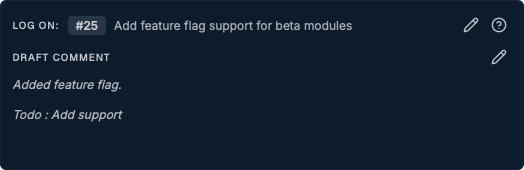
If Reuse last ticket comment is enabled, the draft is automatically filled with the last comment logged for that ticket.
Logging by stopping the timer
When you click Stop, the behavior depends on Express Mode:
Express Mode off (default)
A "Log Time Entry" dialog opens, prefilled with:
- the related ticket;
- the date, start time, and end time;
- the computed duration;
- the activity (the default activity if one is set);
- the comment (your draft).
Review the details, adjust if needed, then click Log Time. To cancel without saving, use Discard time.
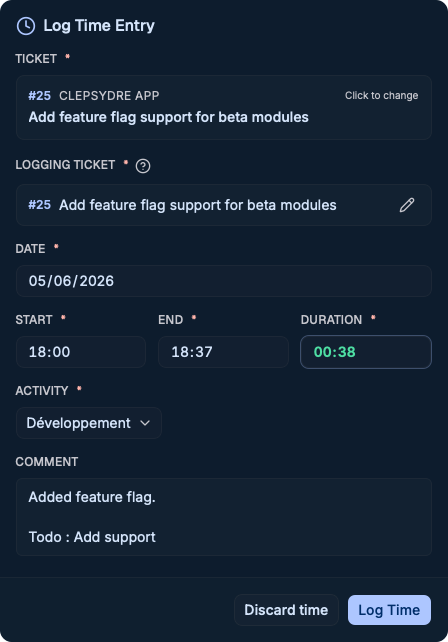
The logging dialog cannot be dismissed with the Escape key or by clicking outside: explicitly choose Log Time or Discard time.
Express Mode on
Time is logged automatically to Redmine, with no confirmation dialog, using the default activity and the comment (draft, or default comment as a fallback). A success message appears, then the timer resets.
Express Mode requires a default activity to be set in the settings.
Manual entry
You are not required to use the stopwatch. The Manual entry button (button in the autocomplete, or under the timer controls, active ticket required) opens the logging dialog directly with a duration of 0, which you fill in yourself.
This is handy to record a past or planned task without having started the timer.
After logging
Once the time is saved:
- the entry appears in the day's timeline;
- the timer resets (except in specific keep-running cases);
- the totals (Redmine Total, Today's Total) are updated.